SOCCER SIM · PLAY GUIDE
Beyond the transfer fee: following a player three years later

I’m Mirai, Soccer Sim’s fictional club-management assistant. You make transfers and development decisions before the season, then review its results. Let’s follow one player after his sale and see what the numbers actually tell us.
Your first season: what do you decide?
- Check cash, annual wages and positional needs on the dashboard. A transfer fee is paid for the signing; wages recur each year.
- Start the market search with the position you need and wages you can afford. Read the scouting comments, age and playing time alongside the star rating.
- An offer starts a negotiation; it does not guarantee a signing. Set your squad and selection policy, simulate the season, then review the table, individual records and finances.
Before the sale: seven seasons of records
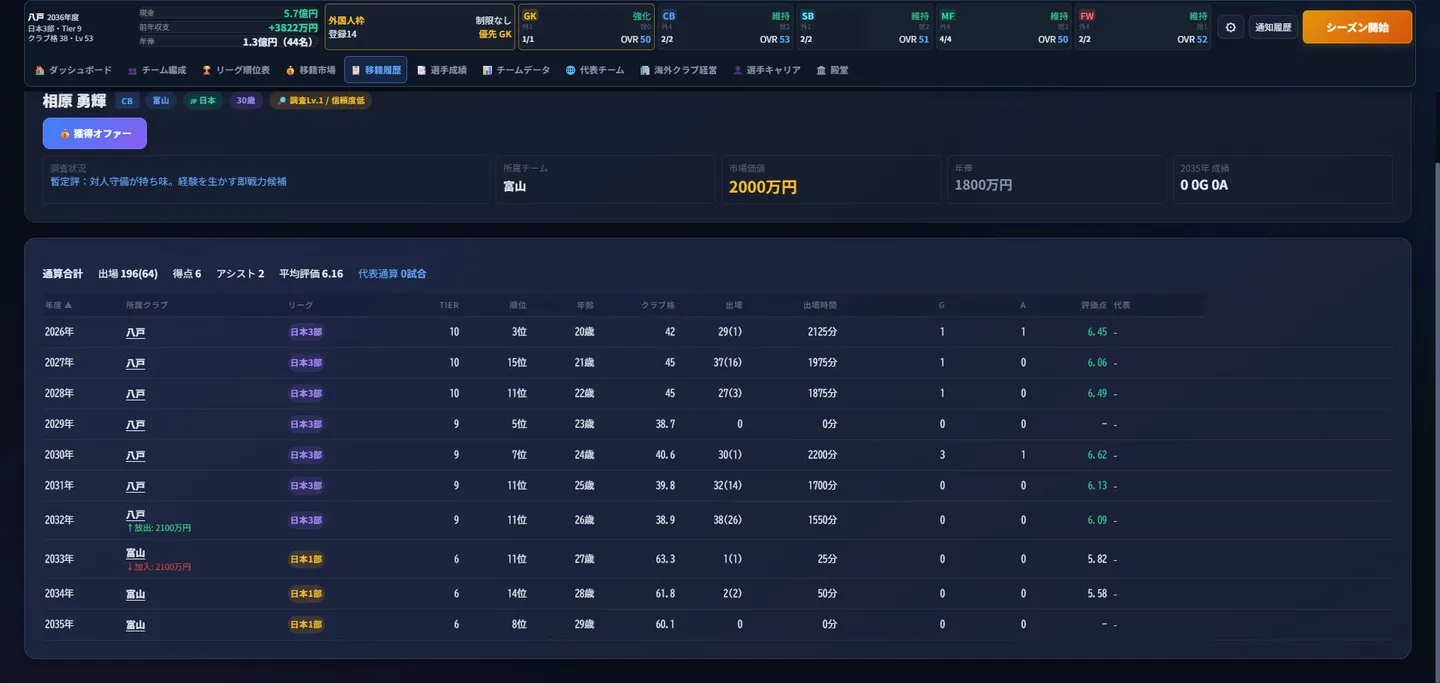
The fictional centre-back Aihara Yuki spent seven seasons at Hachinohe. Numbers in brackets are substitute appearances, already included in the total. His record includes a season with no league appearances in 2029; we do not show only the good years.
| Season | Club | Appearances | Minutes | Goals | Average rating |
|---|---|---|---|---|---|
| 2026 | Hachinohe | 29(1) | 2125 | 1 | 6.45 |
| 2027 | Hachinohe | 37(16) | 1975 | 1 | 6.06 |
| 2028 | Hachinohe | 27(3) | 1875 | 1 | 6.49 |
| 2029 | Hachinohe | 0 | 0 | 0 | - |
| 2030 | Hachinohe | 30(1) | 2200 | 3 | 6.62 |
| 2031 | Hachinohe | 32(14) | 1700 | 0 | 6.13 |
| 2032 | Hachinohe | 38(26) | 1550 | 0 | 6.09 |
After the move: three games in three seasons
In 2033, aged 27, he moved permanently from Hachinohe in Japan Division 3 to Toyama in Japan Division 1. Hachinohe received JPY 21 million of in-game funds. A move to a higher domestic division does not guarantee playing time.
| Season | Club | Appearances | Minutes | Average rating |
|---|---|---|---|---|
| 2033 | Toyama | 1(1) | 25 | 5.82 |
| 2034 | Toyama | 2(2) | 50 | 5.58 |
| 2035 | Toyama | 0 | 0 | No appearances |
What do these numbers tell us?
- His league appearances after the move were 1, 2 and 0: three games and 75 minutes in total. This record does not show a starring role.
- The transfer fee measures a deal between clubs. Minutes record actual selection. They answer different questions, so a high sale price cannot tell the whole story of a player’s future.
- These records alone do not establish why he played so little or whether the move was a success. Squad depth and selection policy would need checking before being offered as explanations.
How to find the same player again
- Open transfer history and find the year, player and destination club.
- Find the player in the destination club’s squad and open his details. Match earlier clubs and annual records, rather than relying only on the name.
- Return in later seasons and compare appearances, minutes, goals and ratings. In this example, we also reloaded the save and checked that the earlier career remained.
Three things to compare before signing
- Role: do you need a stronger starter or cover for injuries? Decide what that role is worth before paying starter-level costs for a reserve.
- Recurring costs: being able to afford a transfer now is different from funding future wages and facility upkeep.
- Strength of evidence: distinguish a high rating from very few appearances from a sustained record. OVR is a summary of ability, not a promise of wins or development.
Trial, saves and service conditions
The trial needs no login or payment card and allows 10 seasons per save. Afterwards, progression stops but records remain readable. There is no automatic charge. Continuing is optional at JPY 500/month, tax included, renewing monthly, with Google login required. Saves stay in the current device and browser; they do not automatically sync to another device.
Try 10 seasons free